As AI makes it easier to write code, draft documents and build prototypes, a useful question to ask is: How clearly do we understand whose problem we are solving, and how will we know whether the result works?
Working with AI can begin with observing people, understanding their situation and designing a way to help. A five-step feedback loop turns those activities into a process that uses real results to improve the next attempt.
This approach applies to software development, documents, analysis and process improvement. People set the goals and remain accountable for decisions, while AI helps think, build and check throughout the process.
The loop at a glance
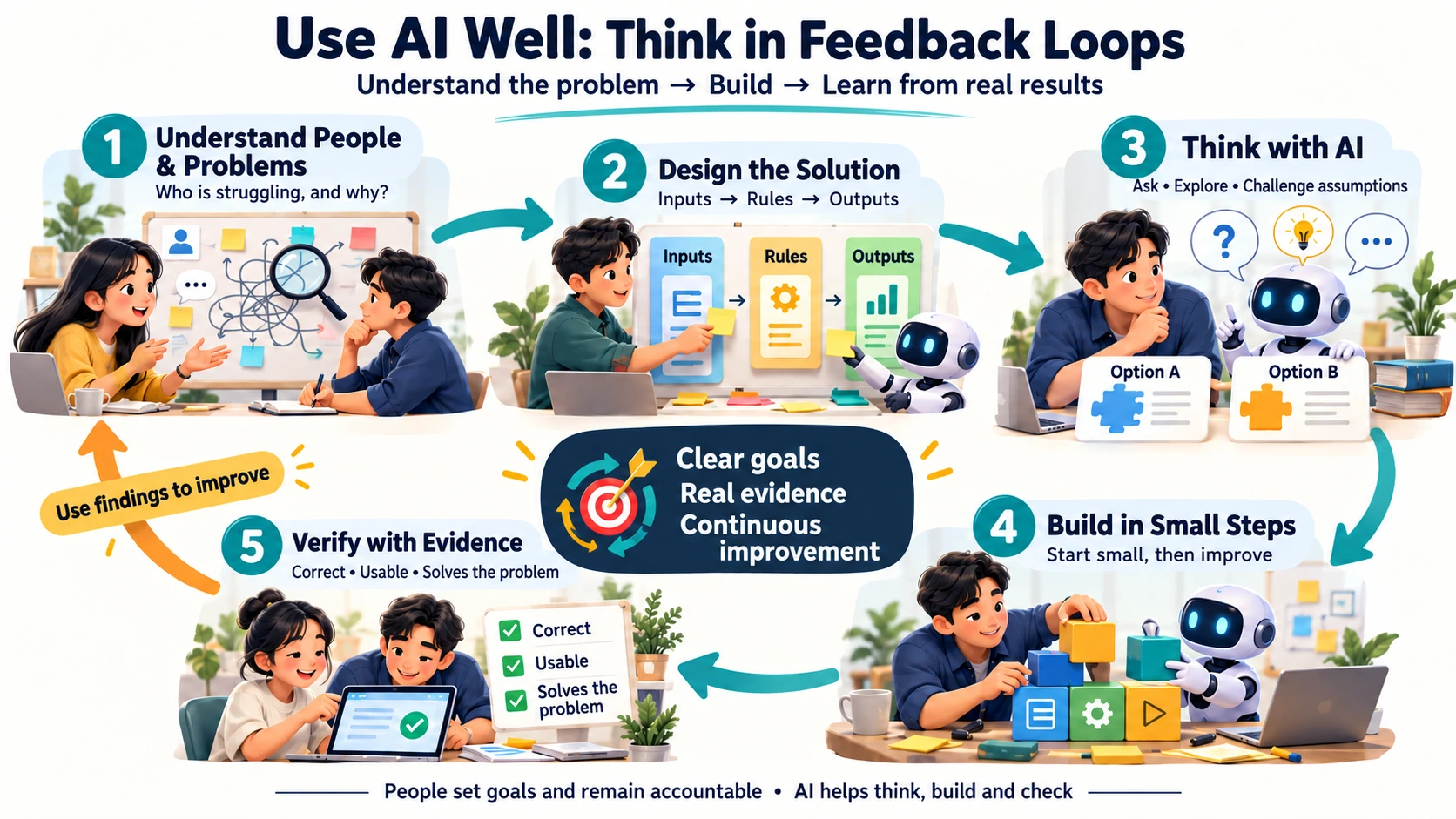
The loop rests on clear goals, real evidence and continuous improvement. When an experiment falls short, use what you learn to decide whether to change the instructions, rules, solution or initial understanding of the problem.
1. Understand people and problems: who is struggling, and why?
Before asking AI to produce something, describe the real situation: who will use the result, what they are trying to do and what makes that difficult.
Suppose a team asks for a document approval system. Starting immediately might produce submission screens, approval buttons and reports. Conversations with staff might reveal a more specific problem: approvers do not know work is waiting, and requesters cannot tell who currently has their document.
That understanding suggests starting with status visibility and notifications, without building every feature at once.
Useful questions include:
- Who is affected, and at which point in the process?
- How do they work around the problem today, and what does that cost them?
- Are there real incidents or documents we can examine?
- What observable change would tell us the problem is getting smaller?
What to produce: A problem statement tied to a person and situation. For example: “Requesters cannot see who has their document, so they repeatedly follow up through chat.”
2. Design the solution: turn understanding into rules
Once the problem is clear, describe how the solution should work in enough detail for people and AI to examine it together.
Here, designing computation means deciding what information enters a system, which rules it applies, how its state changes and what outputs it produces—including how it handles exceptions.
For the approval example, an initial design might cover:
- Inputs: Requester, document type, amount and attachments.
- Decisions: Which approver is required for each spending threshold.
- States: Draft, awaiting approval, returned and approved.
- Exceptions: An approver is on leave, a request is submitted twice or the amount changes after submission.
- Observable outputs: The requester can see the current owner and review the decision history.
You do not need to specify everything in the first round. However, define acceptance criteria before building. One might be: “After a successful submission, the requester can see the status and next approver.” That gives you a concrete way to check the prototype later.
What to produce: A short diagram or set of rules, example inputs and criteria for deciding whether the work is acceptable.
3. Think with AI: uncover questions you have not asked
AI can help from the problem-understanding stage onward. Ask it to organize information, challenge assumptions, compare alternatives and identify missing cases.
A useful design prompt is:
Here is our current document approval process. Separate facts, assumptions and missing information. Then propose two possible solutions, with benefits, limitations and exceptions to check. Do not start coding yet.
If AI suggests notifications, ask who should receive them, when they should be sent and when they should be suppressed. Otherwise, an attempt to improve follow-up could create distracting messages for users.
Compare AI’s suggestions with real information and organizational constraints. People who know the context should decide which options fit and which questions require further conversations with users.
What to produce: Reasoned alternatives, assumptions to check and a solution selected for the first experiment.
4. Build in small steps: make something small enough to learn from
With a clearer problem and rules, choose the smallest piece of work that can answer an important question.
For the approval example, start with one document type, one approval level and a visible status for the requester. Consider multiple levels, delegation and reporting after seeing the results.
AI can draft screens, write code, create sample data and prepare checks. Give each round a clear scope:
Build a prototype for submitting a request and viewing its status. Use the sample data provided, follow the agreed rules and list unsupported cases so we can plan the next round.
Small rounds make it easier to see what helps, what needs repair and where further work is worthwhile. The same principle applies to documents: try an outline and one section before drafting the entire piece.
What to produce: A usable prototype or work product with visible boundaries and limitations.
5. Verify with evidence: does the result solve the problem?
When AI reports that the work is finished, return to your criteria and separate three questions:
- Is it correct? Do the information, rules and calculations match the requirements?
- Is it usable? Can users complete the task in the environment where they need it?
- Does it solve the problem? Has the original difficulty actually decreased?
A working screen is evidence that the screen renders. It does not establish that the system selects the correct approver or reduces follow-up. Choose checks that answer the question you are asking.
For example, ask a requester to submit a document and independently find out who has it and what happens next. Record successful actions, points where help was needed and incorrect information before deciding what to change.
What to produce: Inspectable results, such as example outputs, defect records and user observations, together with changes for the next round.
Close the loop: where should the findings take you?
A feedback loop is useful when findings change the next decision. The right place to return depends on what you discover:
- The system applies a rule incorrectly: Fix the implementation and repeat the same check.
- The rules do not cover an absent approver: Revisit exception handling and agree on the policy with the responsible people.
- The status is correct but users cannot find it: Revisit presentation and actual usage.
- Everyone can see the status but work still stalls: Revisit the problem. Approval authority or workload may be the constraint, and software alone may not resolve it.
The infographic returns from “Verify with evidence” to “Understand people and problems” to encourage a fresh look at the original question. In practice, you do not need to restart everything each time. Return to the step relevant to the finding.
Each round should end with a clear decision: accept the result, change a specific part, run another experiment or stop because further work is not currently worthwhile. Continuous improvement needs a goal and a boundary for each round.
Where do prompts, skills and agents fit?
Clear instructions, reusable working guides and systems that carry out multiple steps can support the loop. They can preserve team rules, prepare checks or help repeat work within a defined scope.
Ask which step a tool supports and how you will check its contribution. If you cannot describe a good result yet, adding instructions or automation may leave the underlying ambiguity unresolved.
Useful foundations to practice alongside tools include asking questions, breaking down problems, designing data and rules, comparing alternatives and evaluating results. These help you choose and use tools with a clearer purpose.
Start with one piece of work
Choose a small task with identifiable users and results you can check. Before talking to AI, write down:
User: Who will use the result?
Problem: What is difficult, and which examples support that understanding?
Goal: What should change?
Information and constraints: What can we use, and which conditions must we respect?
First-round scope: Which part will we try?
Checks: What evidence will tell us whether it passes?
Next iteration: If the result falls short, what should we revisit?
Then ask AI to identify unclear points, suggest an approach and help build one part at a time. Feed real findings back into the problem and solution. Each round can improve both your use of AI and your understanding of the work itself.
Read next: Three ways to make AI in the browser useful and A green status is not an end-to-end test.